Back to work
Case Study Web Design Development F&B

Senyu Fine Dining

Concept project

This is self initiated concept work. No client engagement, no production deployment. The problem, structure, and execution are mine.

Senyu Fine Dining needed a website that matched the prestige of dining in person. Opulent dark aesthetic, full menu architecture, and an inline reservation system. The digital experience earning every table booking before the door opens.

senyurestaurant.com
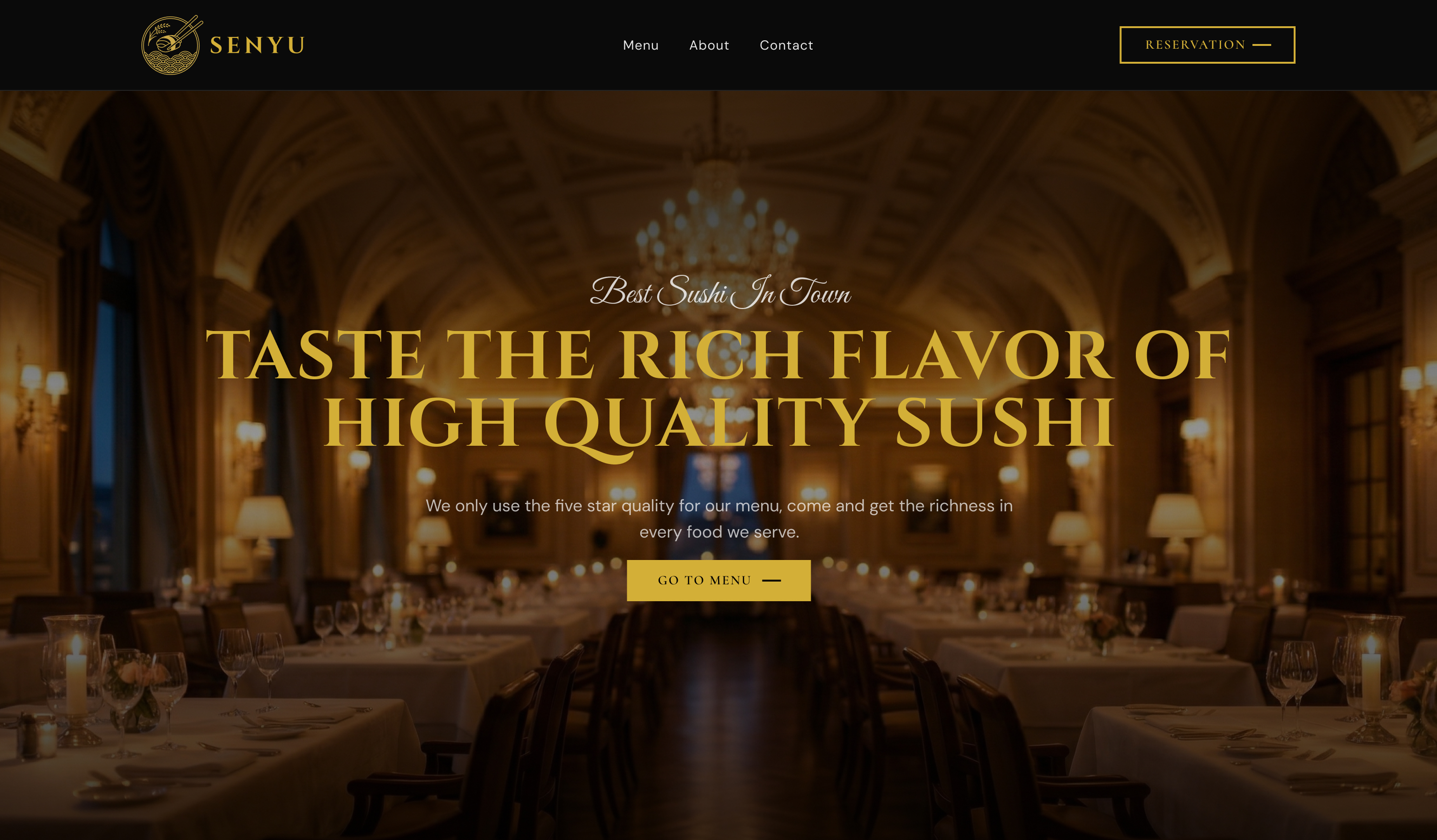
Senyu fine dining website, desktop view

Role

Web Designer

UI Design · Development

Timeline

3 Weeks

Concept through delivery

Scope

Full stack web

Design · Build · Deliver

Tools

Figma

HTML · CSS · JavaScript

The Challenge

Fine dining is sold on atmosphere before a single dish is served. This restaurant's food and ambiance were exceptional, but a generic website would send prospective guests straight to a competitor who could communicate that prestige digitally. Every pixel needed to justify the reservation.

The Gap

Most restaurant websites default to generic templates: stock photography, OpenTable embeds, and menus buried as PDF downloads. For a restaurant at this price point, that gap between digital experience and in-person experience doesn't just underperform. It actively erodes the brand before the guest arrives.

The Brief

Build a website that communicates luxury instantly, makes menu browsing an act of anticipation, and closes the reservation in a single seamless flow. No redirects off the site, no phone calls required.

Senyu fine dining website, full view

Research & Discovery

Competitive Analysis

I audited four restaurant website archetypes, from global luxury chains to independents fully reliant on OpenTable, to map where the fine dining digital experience consistently fails its audience.

Nobu

Strong brand presence and photography. But reservation flows split across markets and a fragmented menu structure dilute the luxury experience at the critical conversion point.

Zuma

Excellent visual staging and atmosphere. Navigation is confident. However the menu is PDF-gated and reservations route out to SevenRooms, breaking immersion at the moment that matters most.

Typical Independent

Template sites dominate: WordPress with a restaurant theme, stock photos, and an OpenTable widget. Nothing signals exclusivity. Nothing earns the table. The food has to do all the heavy lifting.

OpenTable Profile

Frictionless booking for the guest, zero brand control for the restaurant. The digital impression belongs to OpenTable, not the chef. For a restaurant competing on atmosphere, outsourcing that first impression is a brand liability.

Criteria Nobu Zuma Independent OpenTable This Site
Brand Atmosphere Strong Excellent Weak None Immersive
Menu Experience Moderate PDF only PDF / Hidden None Full inline
Reservation Flow Fragmented Redirects out OpenTable Off-site Inline · 1 page
Mobile Experience Good Moderate Poor Generic Optimised
Custom-built Yes Yes No No Yes

Research & Discovery

User Personas

Two people use this website with fundamentally different intentions. Every design decision was tested against both: does this earn the diner's trust? Does this reduce the owner's dependency on phone calls?

AK

Aiko Kobayashi

Marketing Director · Celebrating an anniversary

The Guest

Background

Plans special occasions with research. Visits 3 to 5 restaurant websites before choosing. Expects the website to validate the decision: if the site feels cheap, the experience probably is. Has booked reservations online for 8 years and will not pick up the phone if an online option exists.

Primary Goal

Confirm the restaurant is worth the price before committing. Menu, atmosphere cues, and a frictionless booking flow are the deciding factors. She wants to feel the occasion before she arrives.

Pain Points

  • PDF menus are inaccessible on mobile and kill the browsing experience
  • Redirecting to OpenTable or calling a phone number breaks immersion
  • Generic template sites signal a restaurant that doesn't care about presentation

"If the website looks like a Squarespace template, I assume the attention to detail in the kitchen is the same."

KN

Kenji Nakamura

Head Chef & Owner · 12-table omakase

The Owner

Background

18 years in fine dining, opened his own restaurant three years ago. The kitchen is his domain. The phone, the front-of-house scheduling, and the reservation spreadsheet are not. Loses 4 to 6 hours a week to phone calls that could be self-serve. Has no technical staff.

Primary Goal

A website that handles reservations without him. No monthly OpenTable fee, no phone calls during service, no spreadsheet at the end of the night. The brand should feel as considered as the food he plates.

Pain Points

  • 4 to 6 hours weekly lost to phone reservation calls that interrupt service
  • OpenTable fees compound monthly and brand control is surrendered
  • Existing site doesn't reflect the calibre of the food or the years of craft behind it

"I built this restaurant with my hands. The website should feel like I built that too."

Research & Discovery

The Diner's Journey

Aiko's path from restaurant discovery to confirmed reservation, mapped against the friction points this site was designed to eliminate at each step.

01

Discovery

Google search · ~2 min

Action

Searches "best sushi restaurant [city]". Scans 3 to 5 results. First impression from the thumbnail image and meta description. Clicks the most compelling.

Friction

Most restaurant sites load slowly, display stock photography, and provide no immediate signal of quality. Bounce rate is high at this stage.

Design Response

Hero section: full-bleed food photography, clear name and positioning statement. The atmosphere is communicated in under 3 seconds.

02

Menu Evaluation

Browsing · ~4 min

Action

Navigates to the menu to check if there are options they'll enjoy and to validate price expectations before committing. Looks for item names, descriptions, and pricing.

Friction

PDF menus require download, can't be read comfortably on mobile, and have no design continuity with the brand. No pricing on some sites creates anxiety.

Design Response

Four inline menu categories (Nigiri, Sashimi, Specialty Rolls, Appetizers) with descriptions and pricing. Browsable on any device. A "Today's Special" section adds urgency and delight.

03

Building Conviction

Deeper browse · ~3 min

Action

Wants to know who is behind the food. Looks for a chef profile, the restaurant's story, any signal of craft and intention. Photography of the space helps visualise the occasion.

Friction

Generic "About" pages with no personality. Stock chef photography. No visual connection between the food and the person who creates it.

Design Response

Master Chef profile section with narrative biography beneath the reservation block. The chef becomes part of the reason to book, not an afterthought in the footer.

04

Reservation

Booking · <2 min

Action

Ready to book. Needs to select date, time, and party size. Expects the process to take under two minutes and stay within the same visual environment.

Friction

Redirected off-site to OpenTable or SevenRooms. The luxury aesthetic collapses the moment the third-party widget appears. Phone call requests in 2024 feel like a failure.

Design Response

Inline calendar-based reservation: date picker, time selector, party size, all on one page, no redirect. Confirmation stays on-brand. The entire flow takes under 90 seconds.

Design Process

From brief to build

01 · Information Architecture

Page Structure & Content Hierarchy

Senyu Fine Dining
Hero
Full-bleed image
Tagline
Reserve CTA
Menu
Nigiri
Sashimi
Specialty Rolls
Appetizers
Special
Today's Feature
Seasonal Picks
Reserve
Date Picker
Time Selector
Party Size
Chef
Portrait
Biography
Philosophy
Visit
Hours
Map
Contact

02 · Key Screens

Screen 1, Homepage hero

Homepage Hero

Full-bleed dining room photography, gold-tinted headline, and a single CTA above the fold. Atmosphere is communicated before a word is read.

Screen 2, Menu page

Menu Page

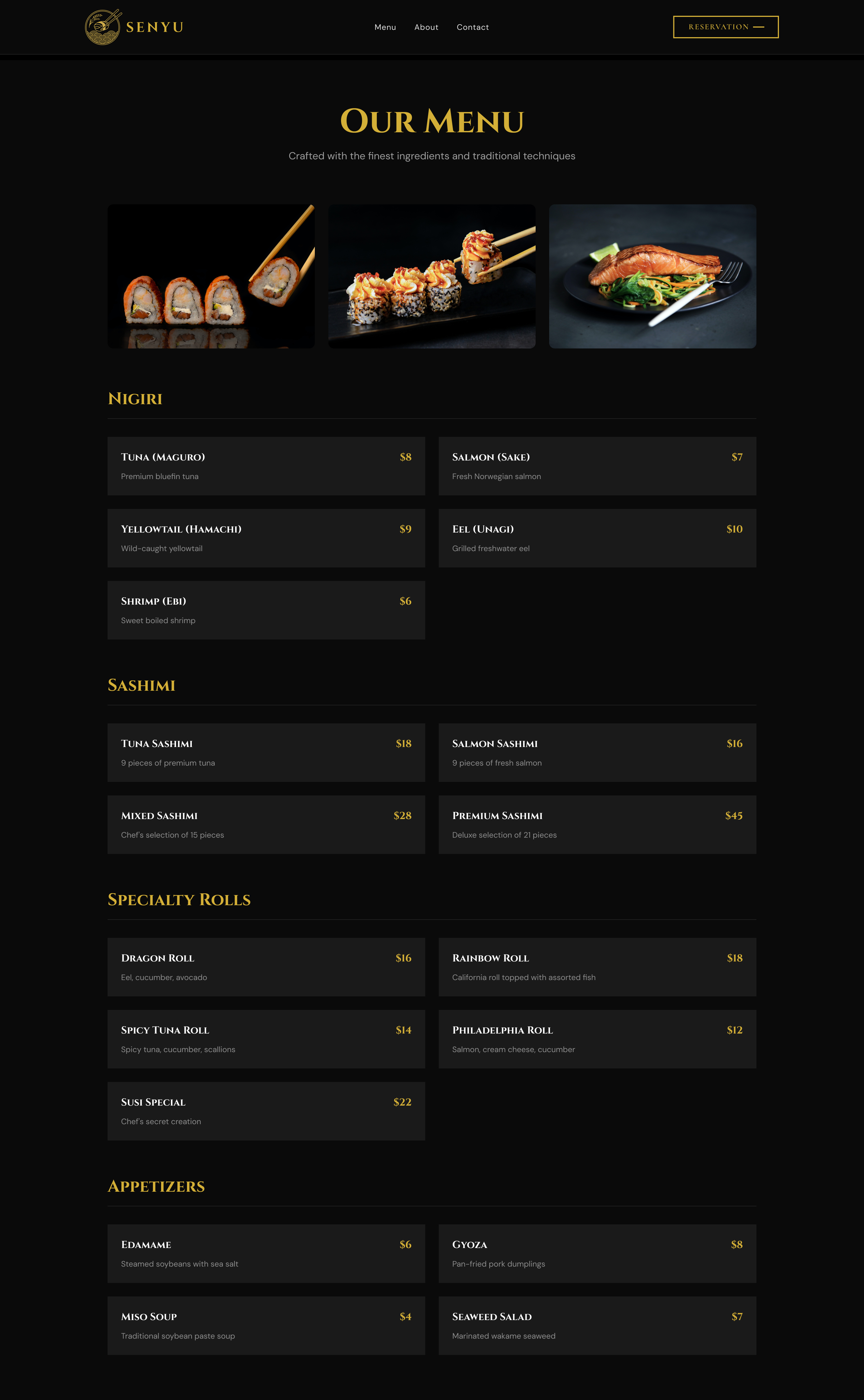
Four categories (Nigiri, Sashimi, Specialty Rolls, Appetizers) with photography, descriptions, and pricing. Browsable on any device without a PDF in sight.

Screen 3, Fine Dining Experience

Fine Dining Experience

Core

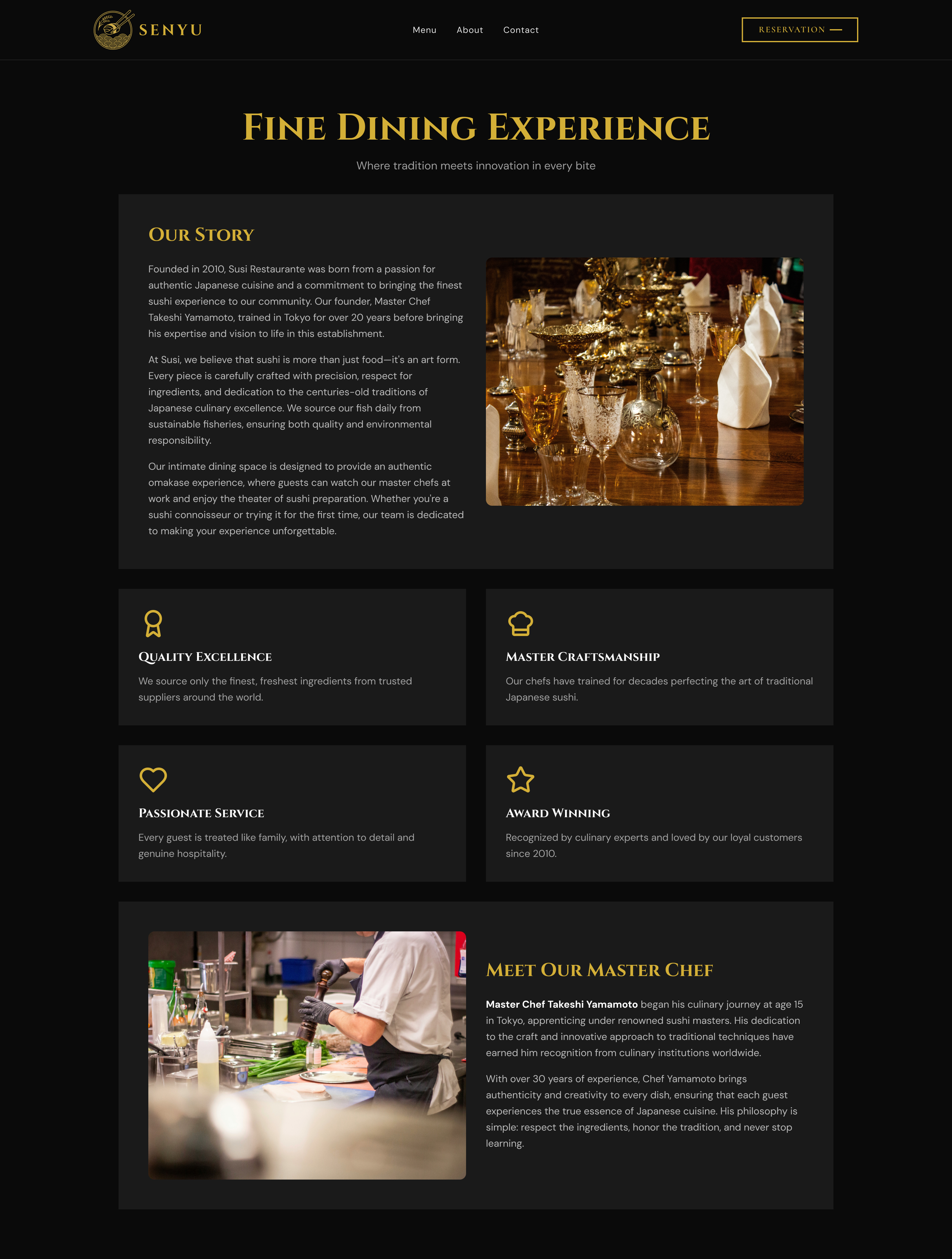
Our Story, four brand values, and the Master Chef profile. The emotional case for booking before the reservation form is reached.

Design Process

High-Fidelity Screens

9 screens covering the full site experience, from the first impression on the homepage to reservation confirmation. Each screen is built around a specific guest or owner need.

Screen 1, Homepage Hero
Screen 1, Homepage hero

Screen 1. Homepage hero. Full-bleed dining room photograph sets the tone before a word is read. Gold headline and "Go to Menu" CTA sit centre-screen; navigation is minimal: Menu, About, Contact, Reservation.

Screen 2, Menu
Screen 2, Menu page

Screen 2. Menu page. Photography leads each category above a browsable item grid: Nigiri, Sashimi, Specialty Rolls, Appetizers. Name, description, and price for every item. No PDF, no redirect.

Screen 3, Fine Dining Experience

Screen 3. Fine Dining Experience. Our Story opens the page, followed by four value pillars and the Master Chef profile: portrait, biography, culinary philosophy. The chef becomes part of the reason to book.

Screen 4, Contact Us
Screen 4, Contact page

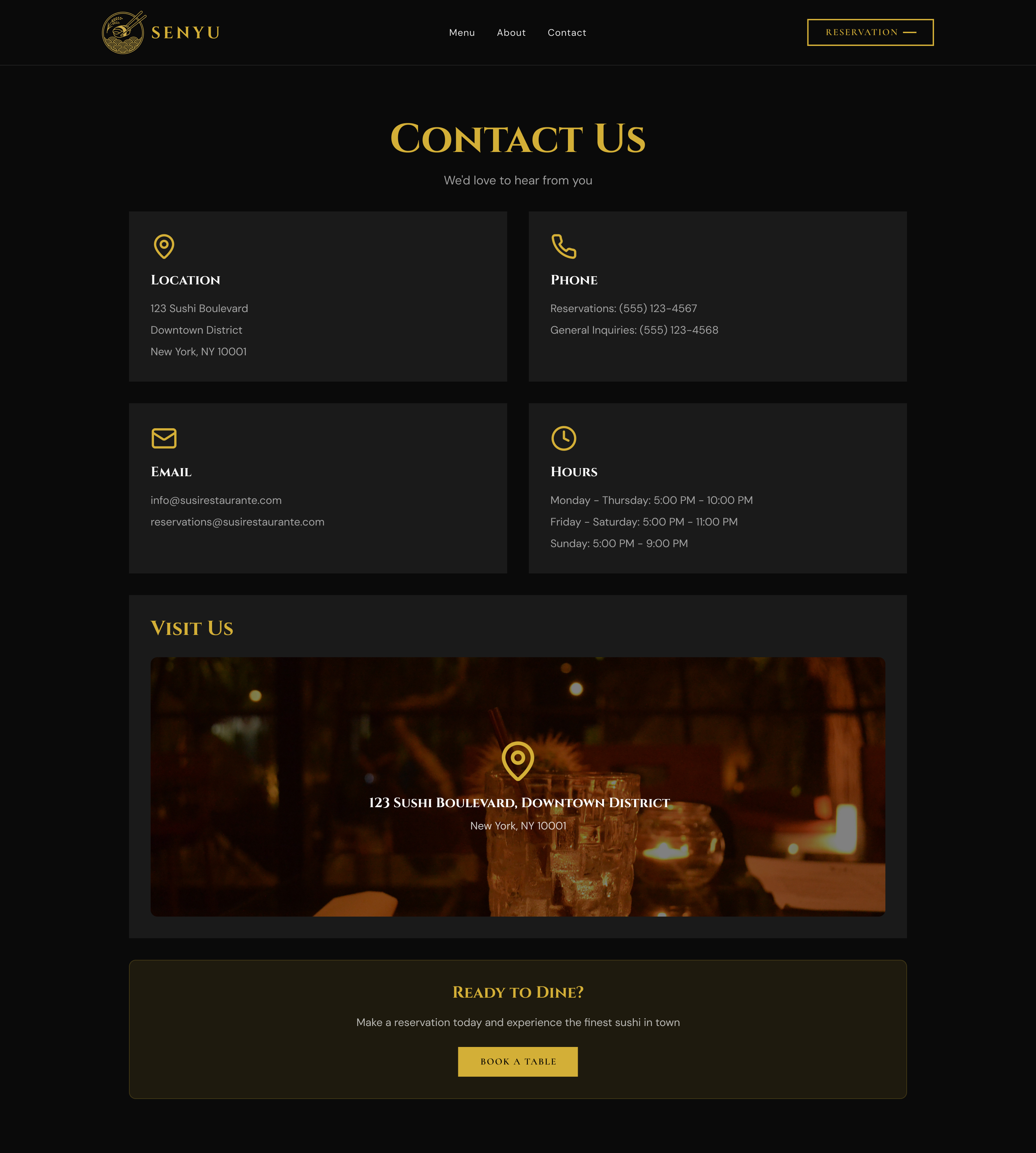
Screen 4. Contact page. Location, phone, email, and hours in four equal cards for quick scanning. Full-bleed photograph with map pin and a "Ready to Dine?" CTA close the page.

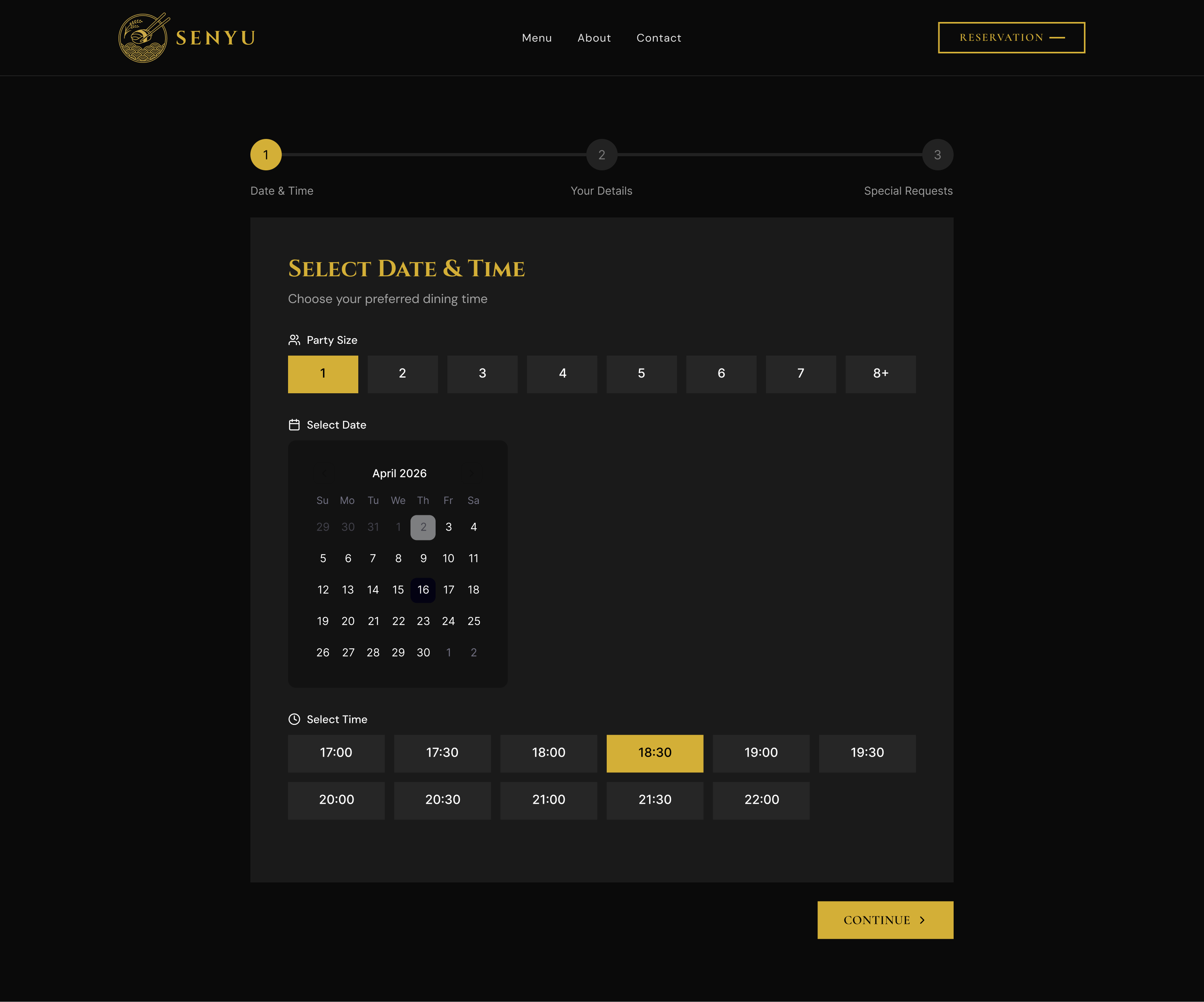
Screen 5, Reservation: Step 1 (default)
Screen 5, Reservation Step 1 empty state

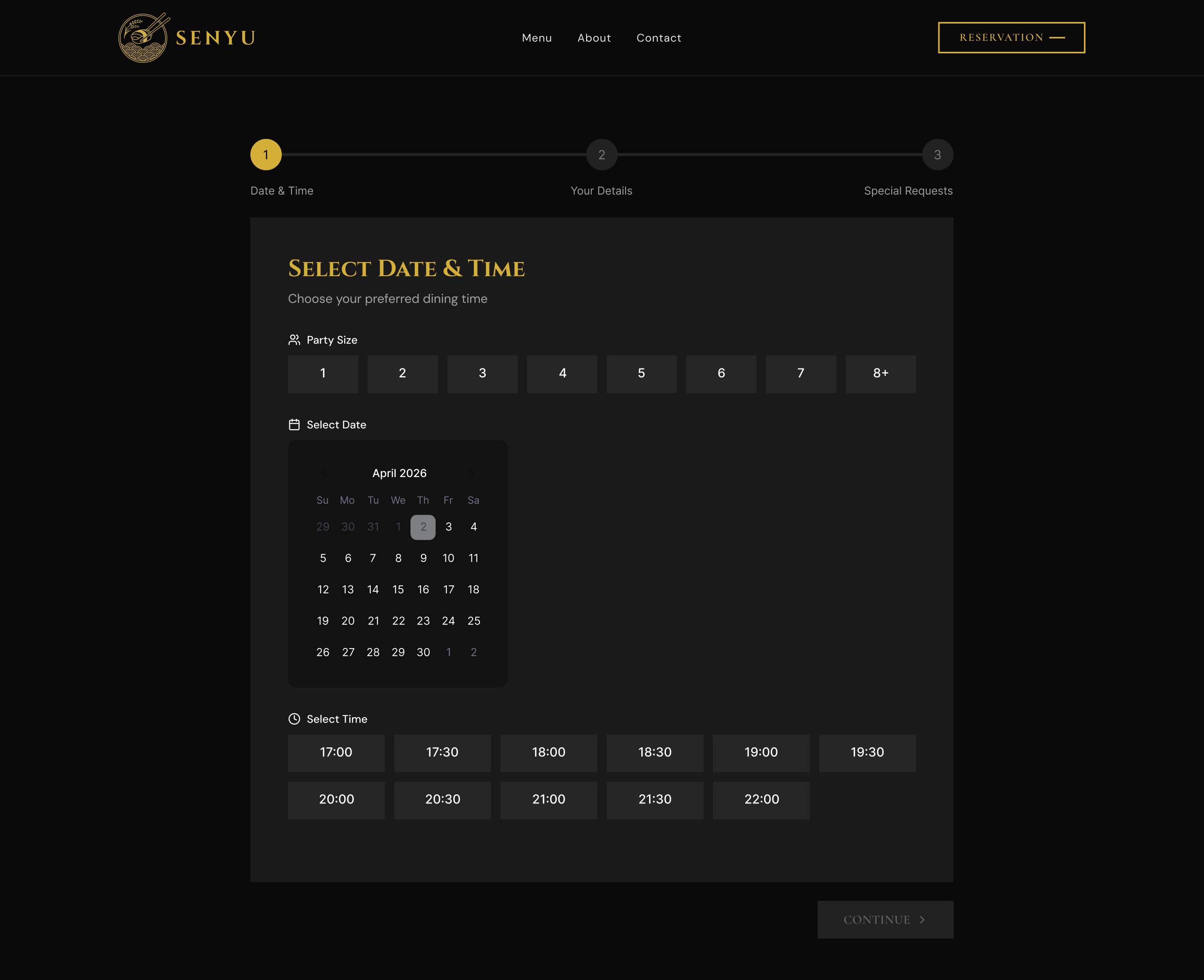
Screen 5. Reservation Step 1, default state. Party size, inline calendar, and time slots on one screen. The 3-step progress indicator shows exactly what's ahead before the guest begins.

Screen 6, Reservation: Step 1 (active) Active
Screen 6, Reservation Step 1 active state

Screen 6. Reservation Step 1, selections made. Party size highlighted in gold, time slot chosen, Continue activated. The interface communicates readiness before the guest clicks forward.

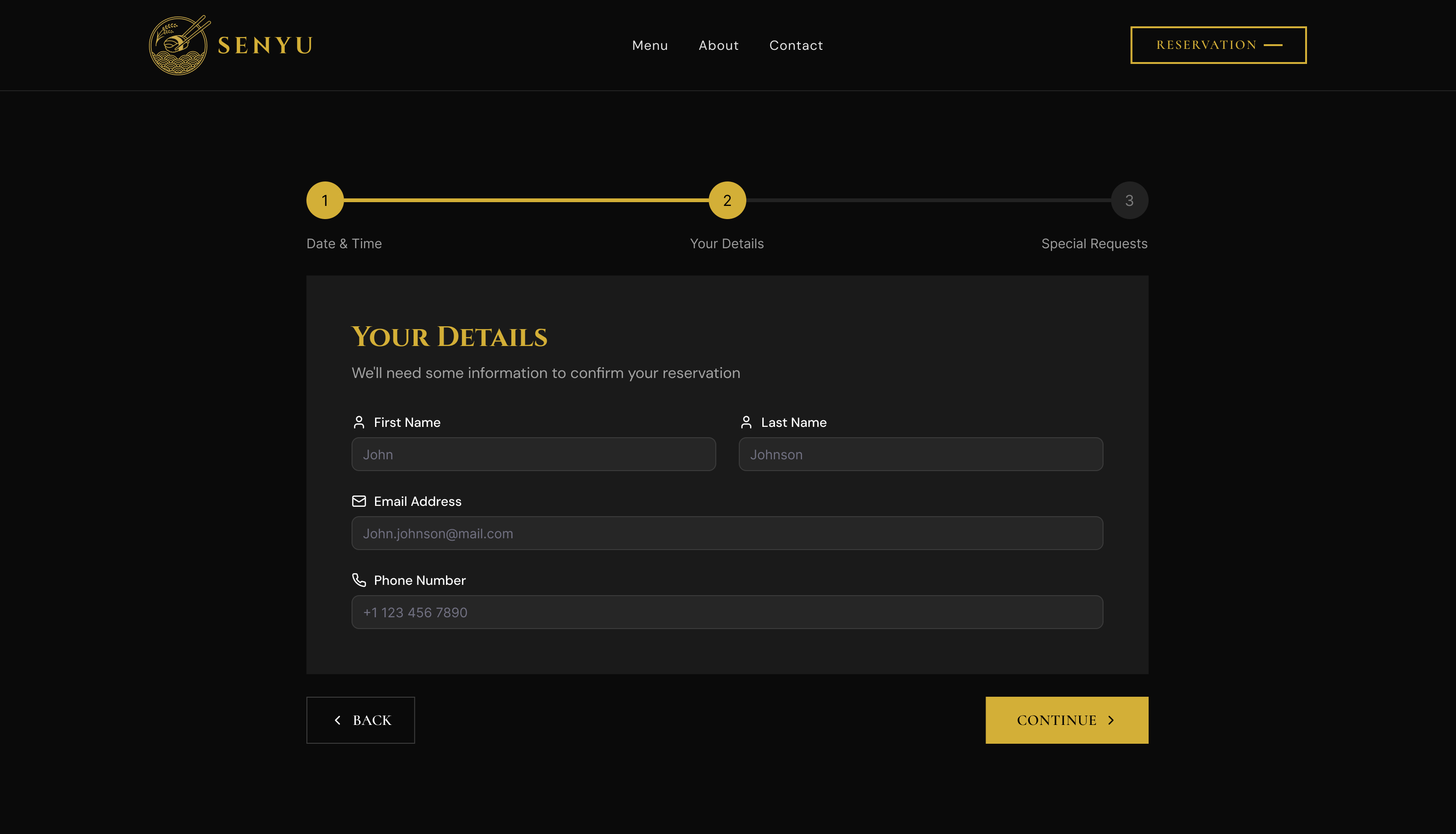
Screen 7, Reservation: Step 2
Screen 7, Reservation Step 2 Your Details

Screen 7. Reservation Step 2, Your Details. Four fields only: first name, last name, email, phone. Enough to confirm and send a reminder. Back and Continue always visible.

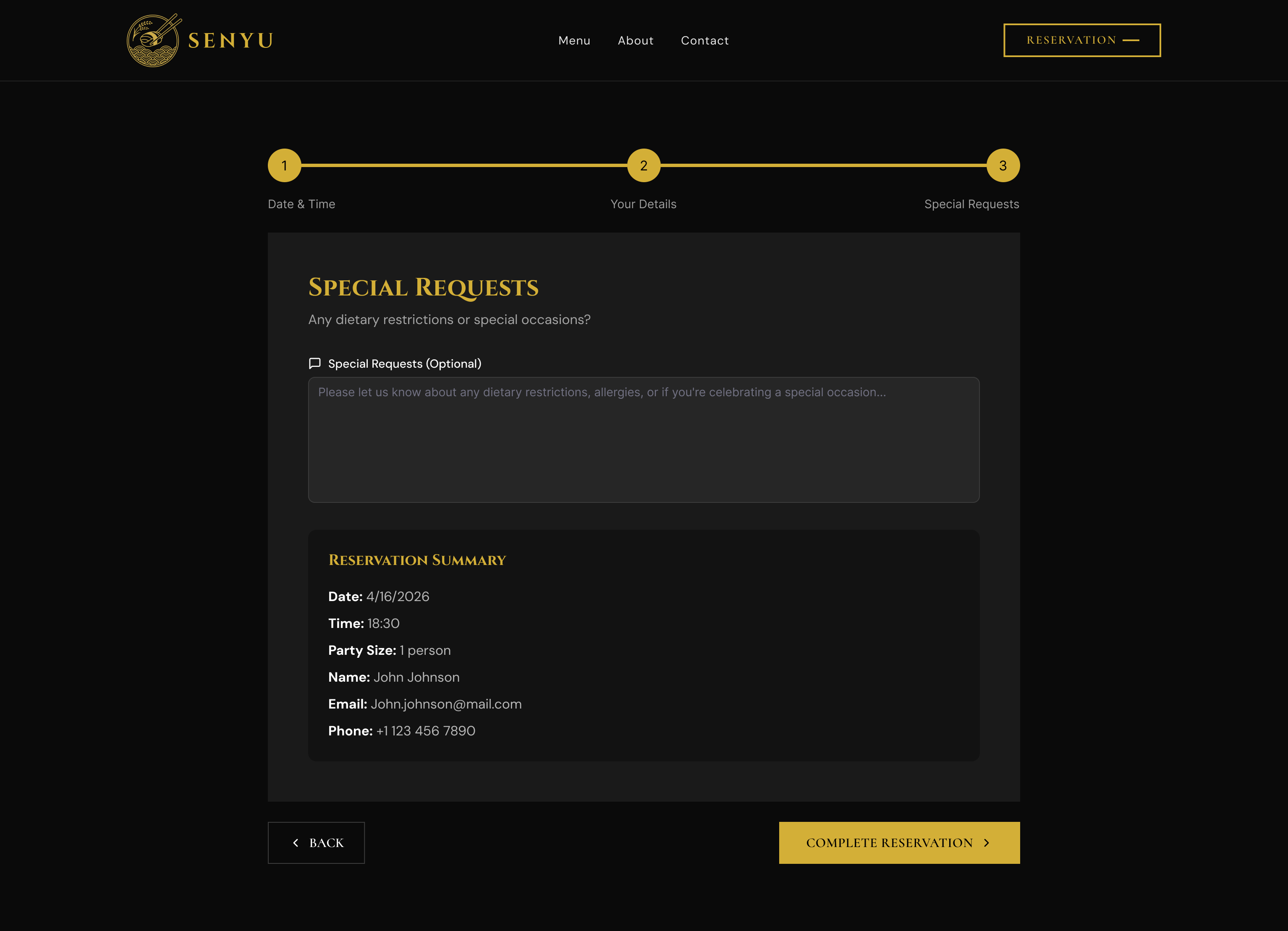
Screen 8, Reservation: Step 3
Screen 8, Reservation Step 3 Special Requests

Screen 8. Reservation Step 3, Special Requests. Optional textarea for dietary needs above a full booking summary. Everything reviewable before the single "Complete Reservation" CTA.

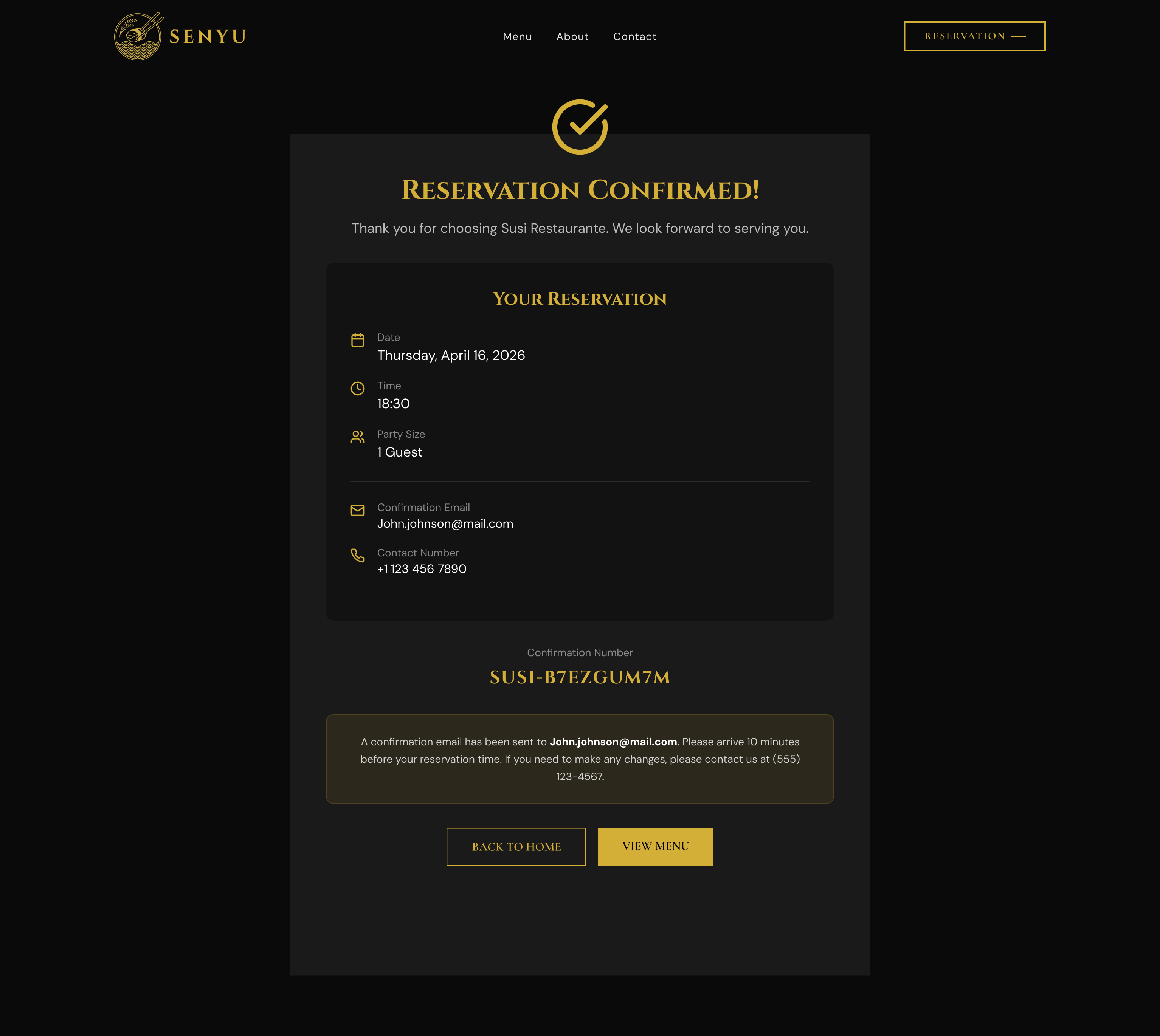
Screen 9, Reservation Confirmed End state
Screen 9, Reservation confirmed

Screen 9. Reservation Confirmed. Gold checkmark, booking summary, and unique confirmation number. Two exit CTAs (Back to Home, View Menu) close the flow without a dead end.

Design Decisions

Four choices that shaped the site

01

Dark luxury palette

The decision to go jet black with antique gold wasn't aesthetic preference. It was competitive positioning. Every restaurant website in the reference set defaulted to white or cream. A full dark canvas made the photography the subject, created instant visual distinction, and signalled a level of craft in the design itself that translated directly onto the food. Gold (#C9A258) was selected for its warmth over the cooler yellows; it reads as earned, not decorative.

#C9A258 · Antique Gold
#0A0805 · Jet Black
#F5F0E8 · Warm Cream
02

Inline reservation. No redirect.

Every third-party reservation widget (OpenTable, SevenRooms, Resy) breaks immersion. The guest spends 4 minutes inside a crafted atmosphere, then clicks "Reserve" and lands on a generic white widget with corporate branding. The solution was a custom inline booking block: date picker, time slots, party size, and name/contact fields, all within the site's own design system. No redirect. The reservation completes without the guest ever leaving the page.

Before: 3rd-party widget

  1. 1. Click "Reserve" on branded site
  2. 2. Redirect to OpenTable / SevenRooms
  3. 3. White corporate interface loads
  4. 4. Fill out generic form
  5. 5. Confirmation email from 3rd party

After: inline booking

  1. 1. Scroll to reservation block
  2. 2. Pick date, time, party size
  3. 3. Enter name and contact
  4. 4. Confirm, stays on the site
  5.  
03

Menu as experience, not information dump

A PDF menu is a failure mode. It requires a download, renders poorly on mobile, carries no brand continuity, and cannot be updated without re-uploading a file. The inline menu was designed as a content section, four tabbed categories (Nigiri, Sashimi, Specialty Rolls, Appetizers), each with item names, descriptions, and pricing displayed as a browsable grid. A "Today's Special" rotator sits above the menu to surface the freshest offering and drive return visits from regulars. The menu is the product catalogue and the closing argument simultaneously.

04

Chef profile as the conversion trigger

The decision to place the Master Chef's profile immediately beneath the reservation block was deliberate. At that point in the page, the guest has browsed the menu, considered the price, and is on the edge of committing. The chef's portrait, biography, and culinary philosophy turn a transaction into an occasion. It answers the question "is this worth it?" at the exact moment it's asked. A table reservation at a restaurant is partly a reservation with the person who made the food, the site makes that explicit.

Results & Impact

Delivered outcomes

4

Menu categories, fully inline

Nigiri, Sashimi, Specialty Rolls, and Appetizers with item names, descriptions, and pricing. No PDF. Browsable on any screen.

0

Third-party redirects

The entire reservation flow (date, time, party size, confirmation) completes on a single page with no redirect to OpenTable or any external service.

Shipped

Delivered in 3 weeks

Responsive across all breakpoints. Gold-on-black. Every table reservation now begins here, and the site became the restaurant's best-performing front-of-house staff member.

Phone calls eliminated

The owner's 4 to 6 hours weekly of reservation calls during service shifted to a self-serve booking system. Every reservation that would have required a call now completes online, including during peak service hours.

Brand continuity

Every pixel of the guest's digital journey, from landing to confirmation, is inside a consistent luxury aesthetic. The first impression is now as considered as the last course. The site became part of the restaurant's identity.

Repeat visit incentive

The "Today's Special" rotator gives existing guests a reason to return to the site between visits. Regulars check for seasonal specials, converting what would have been a one-visit utility page into a lightweight engagement loop.

Reflection

What I would do differently

With More Time

I would add a backend reservation management dashboard for the owner: a simple admin view showing upcoming bookings, party sizes, and contact details without requiring spreadsheet maintenance. The frontend reservation flow is complete; the missing piece is closing the loop on the owner's side so the booking data is immediately actionable. A confirmation email system with the same visual language as the site would also reinforce the brand post-booking.

What I Learned

Luxury digital design is not decoration. It is the systematic elimination of anything that contradicts the brand promise. Every redirect, every generic widget, every stock photograph is a micro-contradiction. The discipline of this project was resisting the convenient solution (third-party booking, PDF menu) in favour of the consistent one. The result is a site where no element breaks the atmosphere, because every decision was tested against the question: does this feel like the restaurant?

Deakin Dental

Next project

Deakin Dental →

From marketing site to patient portal. A web application that replaced phone calls, paper forms, and fragmented communication with one unified platform.