Back to work
Case Study Product Design Web Application Healthcare Patient Portal Booking System

Deakin Dental

A patient portal and booking flow built for the slowest visitor in the funnel. Anxious patients researching family dentists do not need clever UI. They need calm pages and a path to a booked appointment that does not ask them to think twice.
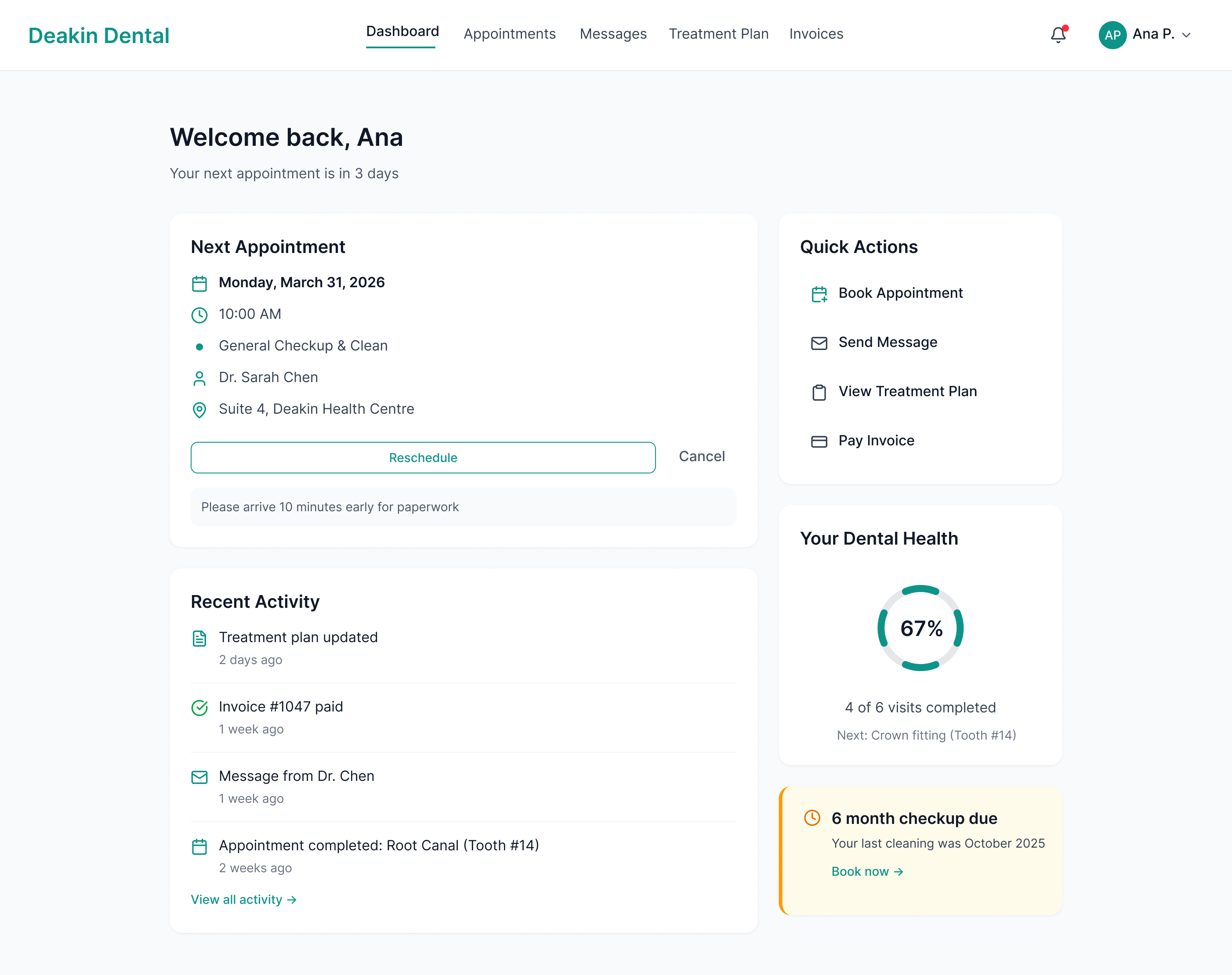
Patient Dashboard

Role

Product Designer

UX/UI · Visual Design · IA

Timeline

8 Weeks

Phase 2 engagement

Scope

End-to-end

Dashboard · Booking · Messaging · Billing

Tools

Figma

Figma Make · FigJam

Context

Phase 2 of an existing client relationship. Phase 1 delivered the marketing website, a conversion-focused site that established the brand's visual language and drove appointment requests entirely through the web. This engagement extends that foundation into a full web application.

The Challenge

The phone was ringing too much

Deakin Dental's marketing site (Phase 1) was converting visitors into phone calls. But the practice was drowning in those calls. Receptionists spent 40% of their day on appointment scheduling, rescheduling, and fielding questions that could be answered through a self-service portal.

Patients had no visibility into their treatment plans between visits. They called to ask about upcoming appointments, outstanding balances, and post-treatment instructions. Medical history forms were filled out on paper and re-entered manually. Insurance claims were tracked in spreadsheets.

The practice needed a patient portal that handled booking, communication, treatment tracking, and billing in one place. The design had to extend the trust and calm established by the marketing site into a full web application that both existing patients and new visitors could use without training.

Patient Dashboard full-width view

Research & Discovery

Competitive Analysis

I audited four existing dental and healthcare patient portals to map where they succeed and where they fail, specifically around booking friction, information access, communication tools, and visual design.

MyChart (Epic)

MyChart (Epic)

Feature-complete but overwhelmingly complex. High cognitive load for routine tasks. Visual design is clinical to the point of feeling impersonal.

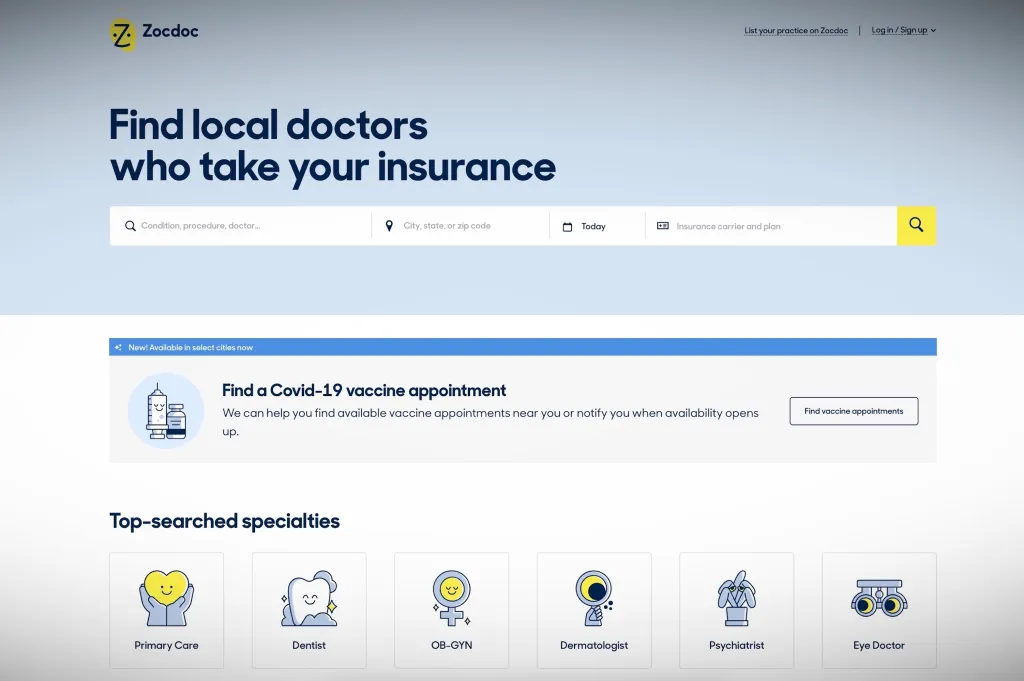
Zocdoc

Zocdoc

Excellent new patient booking experience. Weak on post-appointment relationship. No treatment tracking or direct messaging once booked.

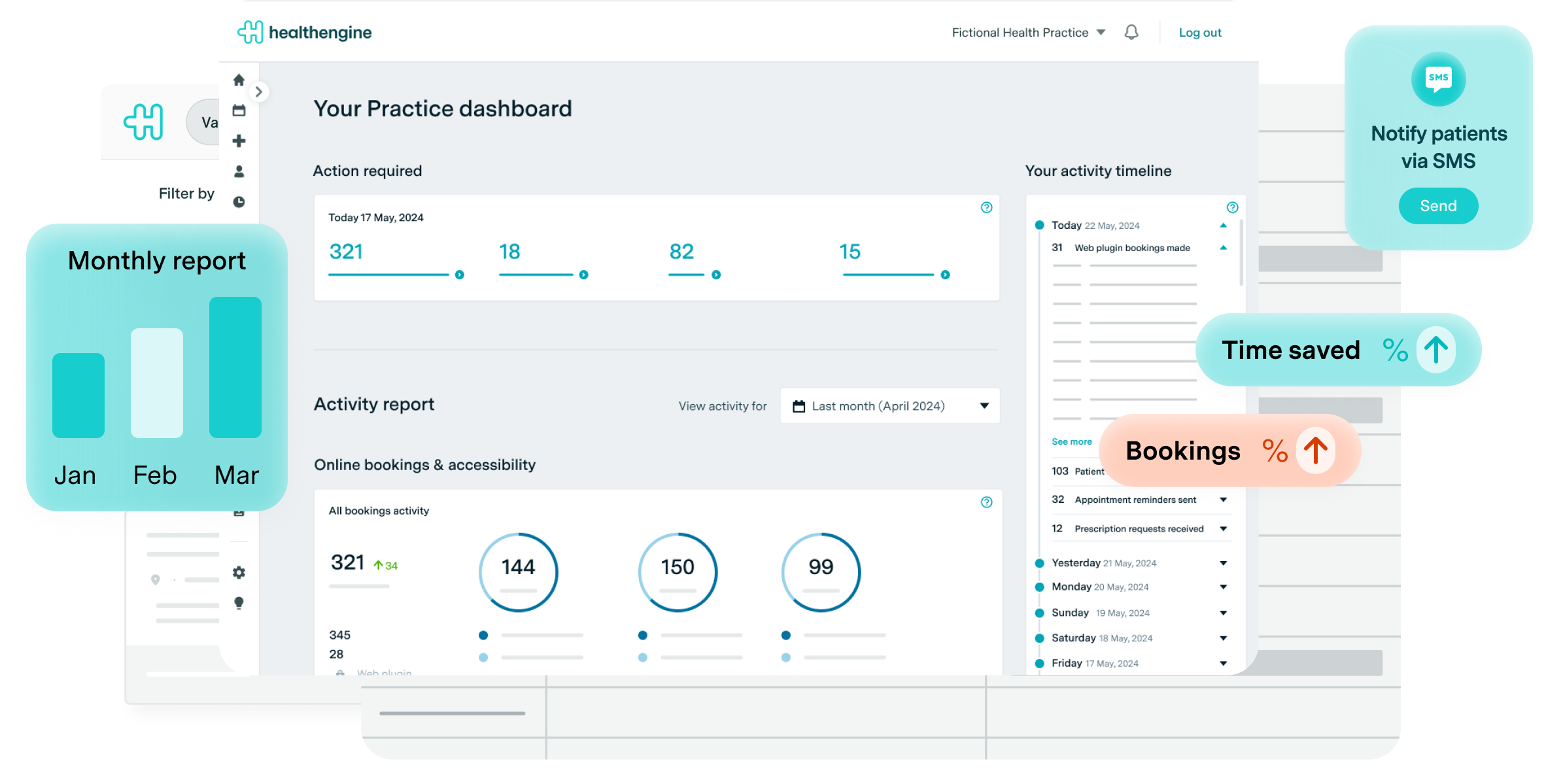
Healthengine

Healthengine

Strong in the Australian market. Booking friction is low but the portal side is sparse, little to no treatment history or ongoing communication.

Dentally

Dentally

Practice management tool with a patient-facing layer bolted on. Designed for the clinic first. Patients feel the seam between the two modes.

Criteria MyChart Zocdoc Healthengine Dentally Deakin Portal
Booking Friction High Low Low Medium Minimal
Information Access Comprehensive Limited Sparse Moderate Full
Communication Tools Secure Messaging None post-visit None Limited Async Messaging
Visual Design Dated Clean Functional Generic Calm, Brand-led

Research & Discovery

User Personas

Two distinct patient types share the same portal, but with fundamentally different expectations. Designing for both without friction drove many of the core interface decisions.

AN

Ana, 48

Existing patient · Multi-visit treatment plan

Returning

Background

Mid-career professional managing a 6-month orthodontic treatment plan. Comfortable with technology. Has penicillin allergy on file. Visits the practice every 3 to 4 weeks and wants continuity between appointments.

Primary Goal

See her treatment progress, message her dentist between visits when something feels off, and pay invoices without having to call the office during business hours.

Pain Points

  • No way to track treatment milestones between appointments without calling
  • Invoice emails get buried, she can't see what's outstanding at a glance
  • Minor concerns between visits go unaddressed because calling feels like an overreaction

"I want to see where I am in the treatment. Am I halfway? Almost done? I have no idea between appointments."

JM

James, 32

New patient · Found practice via Google

New

Background

Software developer who found Deakin Dental through a Google search. Anxious about dental visits due to a difficult experience as a teenager. Values transparency around cost and process. Avoids phone calls wherever possible.

Primary Goal

Book his first appointment online without speaking to anyone, understand roughly what the visit will cost before he arrives, and receive clear post-visit instructions digitally.

Pain Points

  • Most dental practices require a phone call to book, immediate barrier
  • Pricing is never visible upfront, creates anxiety about unexpected costs
  • Paper forms on arrival make the practice feel disorganised before he's even seen the dentist

"If I have to call to book, I'm probably not booking. I'll find someone who lets me do it online."

Research & Discovery

Journey Maps

Two journeys mapped: James's new patient booking flow (from Google search to confirmed appointment) and Ana's weekly self-service flow (checking treatment plan, messaging her dentist, paying an invoice).

Journey 1 · New Patient Booking, James

01

Google Search

Entry point

Action

Searches "dentist Deakin ACT", finds the practice via Google Maps and the marketing site.

Friction

No clear pricing. No "Book Online" CTA visible without scrolling. Uncertain if new patients are accepted.

Portal Response

Public booking page with "New Patient" entry point. Service descriptions with indicative pricing. No account required to start.

02

Booking Flow

3-step process

Action

Tries to select a service, find an available time, and submit contact details.

Friction

Most portals require account creation before showing availability. Phone-only systems stop him entirely.

Portal Response

Step 1: service. Step 2: date and time. Step 3: details. Under 60 seconds total. Account created post-confirmation, not before.

03

Confirmation

Post-booking

Action

Receives booking confirmation and accesses his new patient portal account for the first time.

Friction

Generic "thank you" emails give no next steps. Paper forms still arrive on the day.

Portal Response

Confirmation email links to portal. Digital intake form completed in advance. What to expect on the day, clearly explained.

Journey 2 · Existing Patient Weekly Flow, Ana

MON

Treatment Check

Weekly · ~5 min

Action

Wants to know where she is in her treatment plan and when the next appointment is.

Friction

No way to check without calling. The printed treatment plan given at visit 1 is out of date and missing at home.

Portal Response

Treatment timeline on the dashboard. Visual progress indicator. Next appointment highlighted with a 1-click rebook option.

WED

Message Dentist

As needed

Action

Notices something feels different since the last visit. Wants to ask her dentist without booking an appointment.

Friction

No way to contact the dentist directly. The receptionist is the intermediary for every communication.

Portal Response

Async messaging thread tied to her patient record. Response expected within business hours. No ticket numbers. Conversational tone.

FRI

Pay Invoice

Monthly

Action

Receives an invoice email. Wants to check what it covers before paying and see her outstanding balance.

Friction

PDF invoices sent via email. No breakdown of what's been claimed through insurance. Payment requires calling or visiting in person.

Portal Response

Invoice detail in portal with itemised breakdown. Outstanding balance visible at a glance. Pay online in two clicks.

Design Process

From rough to resolved

01 · Information Architecture

6 Primary Sections & Content Hierarchy

Patient Portal
Dashboard
Next Appointment
Quick Actions
Treatment Progress
Message Preview
Appointments
Upcoming
Book New
Past Visits
X-rays & Notes
Messages
Conversation Thread
New Message
Treatment
Timeline View
Procedure Detail
Cost Breakdown
Invoices
Outstanding
Invoice Detail
Payment History
Profile
Medical History
Insurance
Notifications

02 · 3-Step Booking Flow

01

Select Service

Choose from general check-up, clean, specific treatment, or "Not sure, help me decide." Service cards include indicative price range.

Decision point: New patient vs. existing patient routes here

02

Choose Date & Time

Calendar with real-time availability. Morning, afternoon, and evening slots. First available date highlighted automatically.

No login required at this step

03

Confirm & Create Account

Name, email, phone. Account created automatically post-confirmation. Welcome email includes intake form link and portal access.

Existing patients skip to step 2 via logged-in rebook

Design Process

High-Fidelity Screens

10 screens covering the full patient portal surface, from dashboard overview to invoice detail. Each screen is annotated with the key decision it embodies.

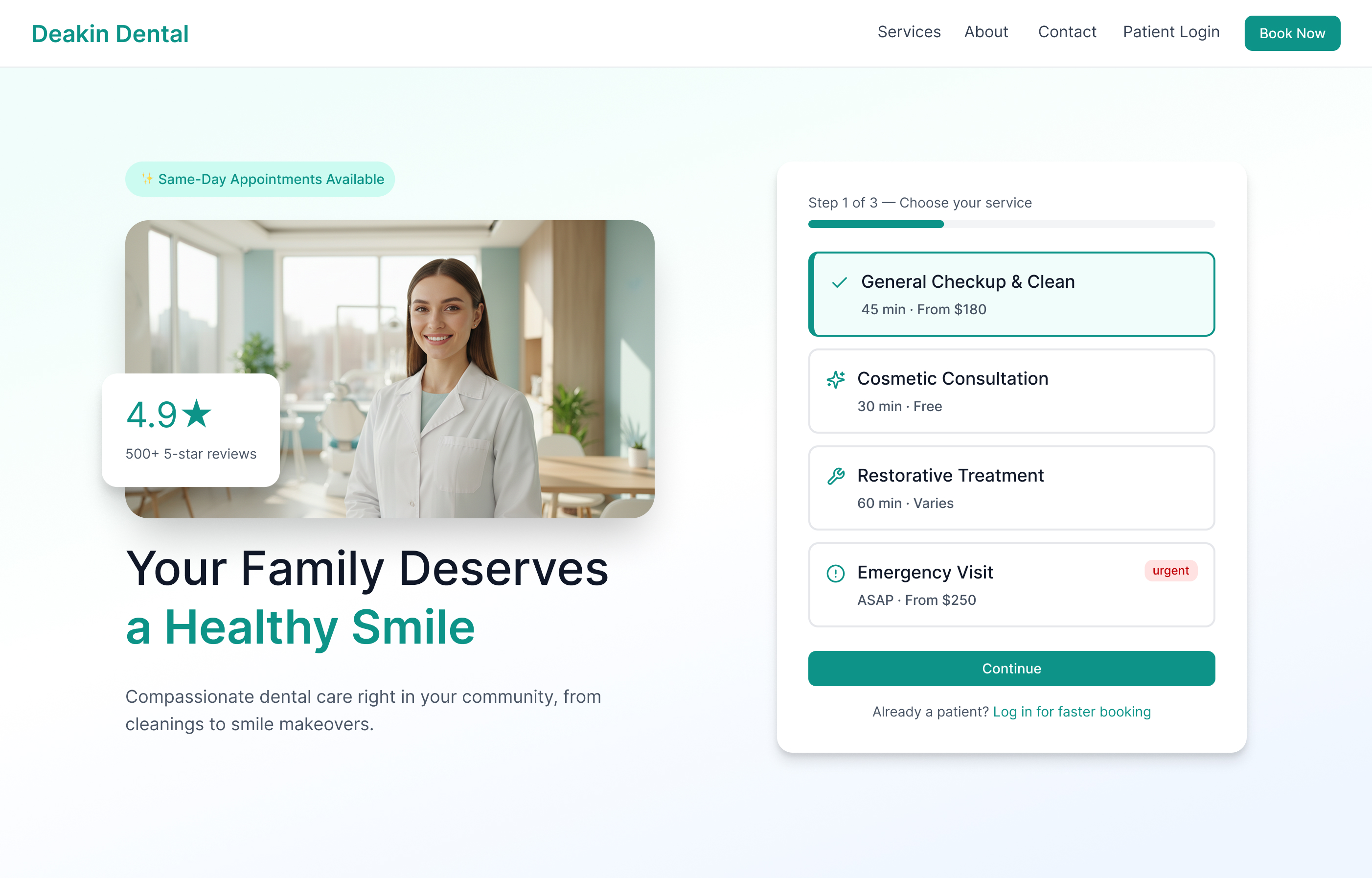
Screen 1: Marketing Homepage

Screen 1. Marketing homepage. Hero with headline, dentist photo, and 4.9★ social proof left; inline booking widget right, service selection Step 1 of 3, so booking is zero clicks from landing.

Screen 2: Patient Dashboard

Screen 2. Patient dashboard. Next appointment above the fold, Quick Actions sidebar, and a Dental Health ring at 67%. Amber nudge for an overdue checkup, all urgent context without requiring navigation.

Screen 3: Appointment Detail

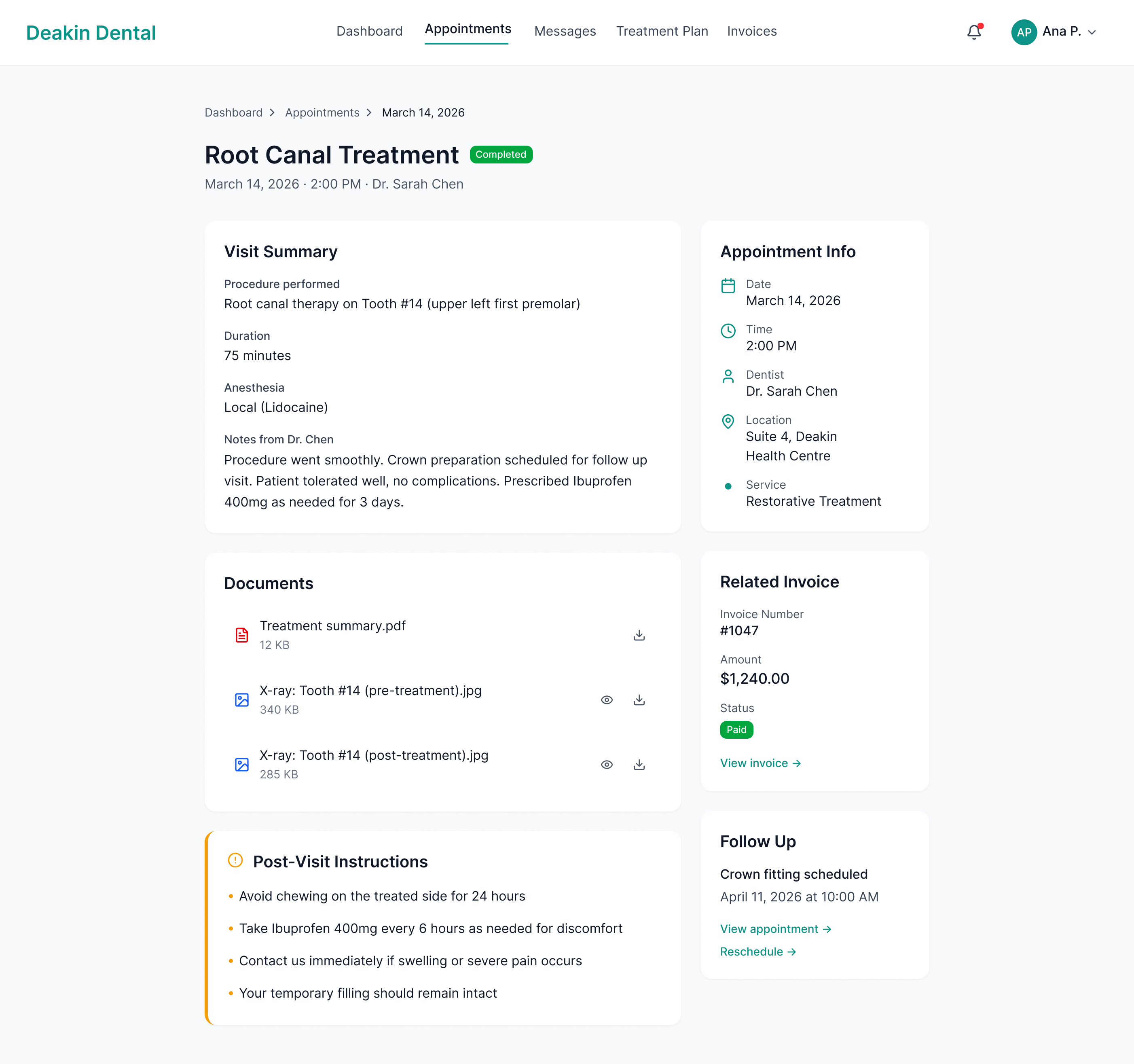
Screen 3. Completed appointment detail. Visit Summary, dentist notes, downloadable X-rays and PDF, related paid invoice, and Post-Visit Instructions in amber, everything from the visit in one place.

Screen 4: Date & Time Picker

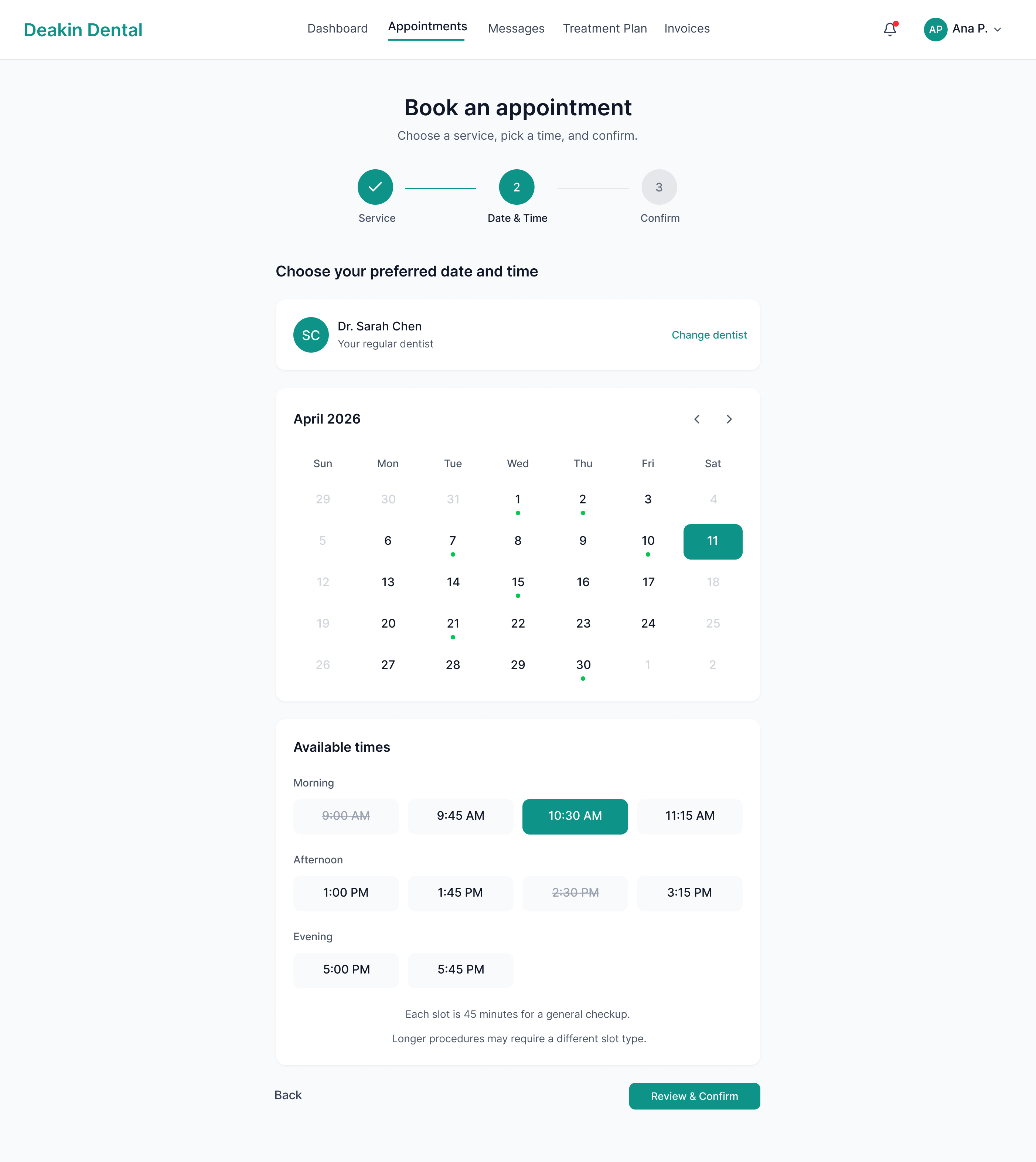
Screen 4. Booking Step 2: Date & Time. Inline calendar with real-time availability split into Morning, Afternoon, and Evening. No dead-end empty states; if a week is full, the next available week surfaces automatically.

Screen 5: Messages
Screen 5: Messages

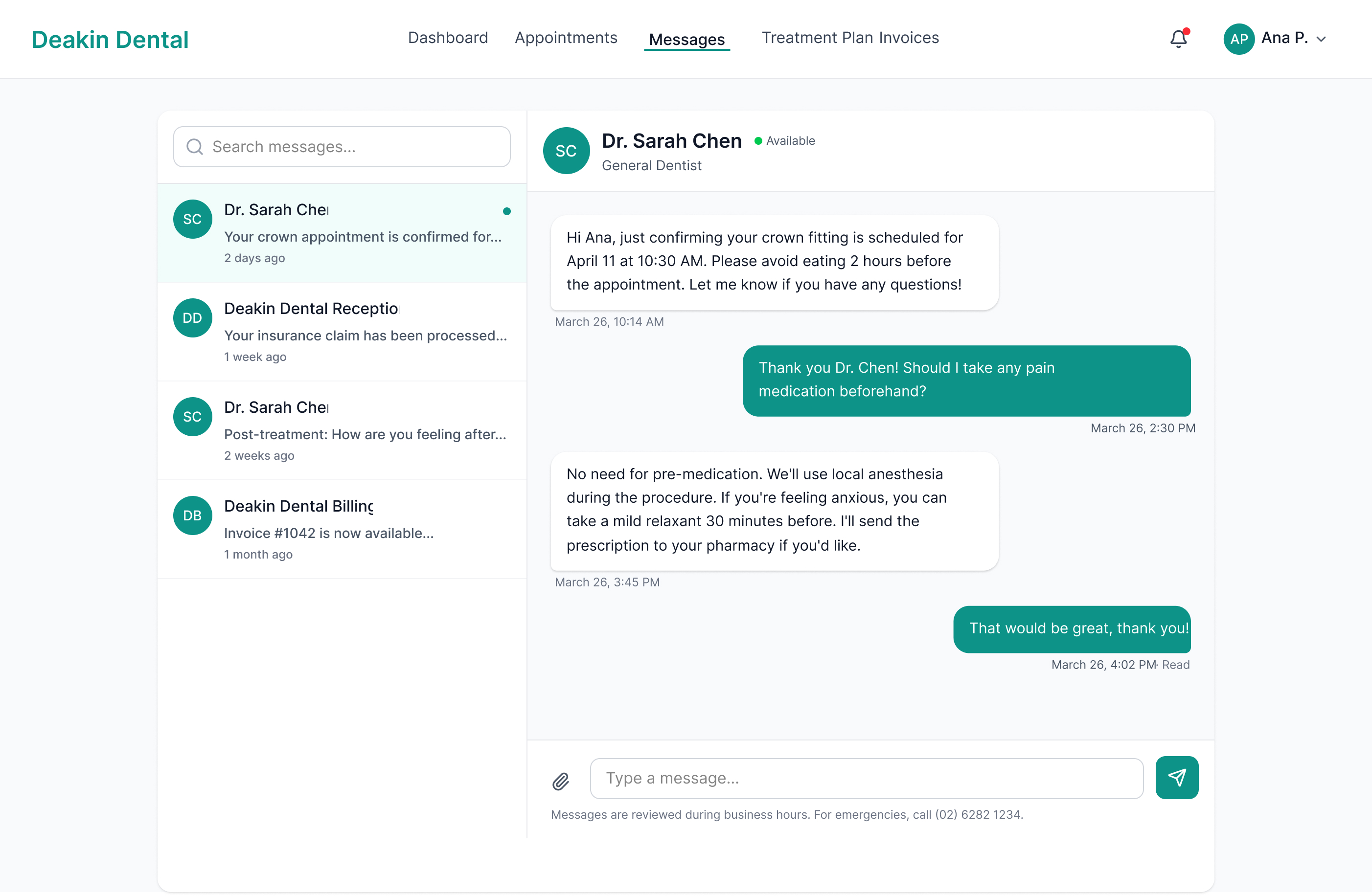
Screen 5. Messaging. Threaded inbox on the left, active conversation on the right. Asynchronous, reviewed during business hours, with an after-hours emergency number in the footer.

Screen 6: Treatment Plan

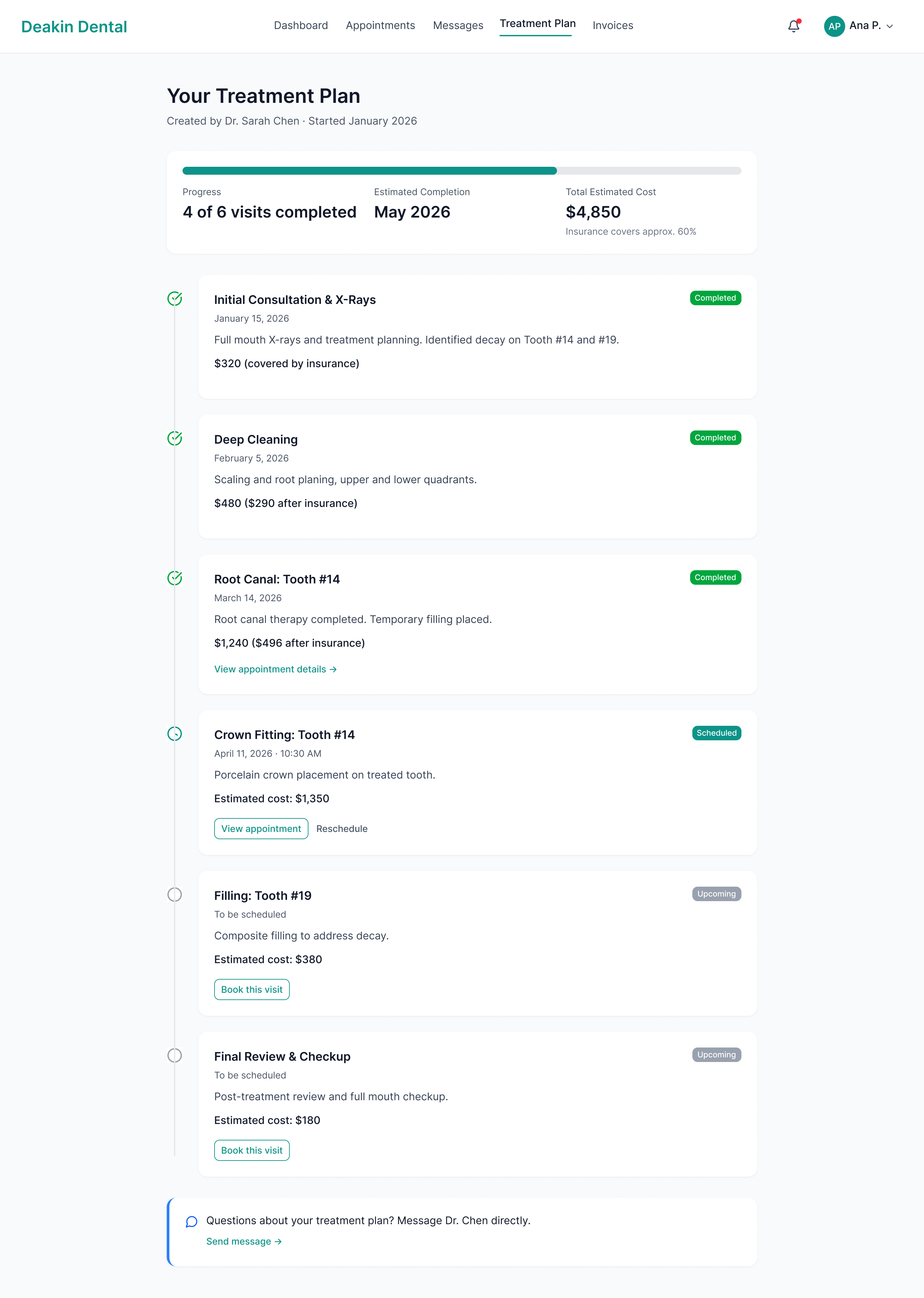
Screen 6. Treatment plan timeline. Progress bar shows 4 of 6 visits completed; each step has a status badge, cost with insurance breakdown, and a "Book this visit" CTA for upcoming procedures.

Screen 7: Invoices & Payments

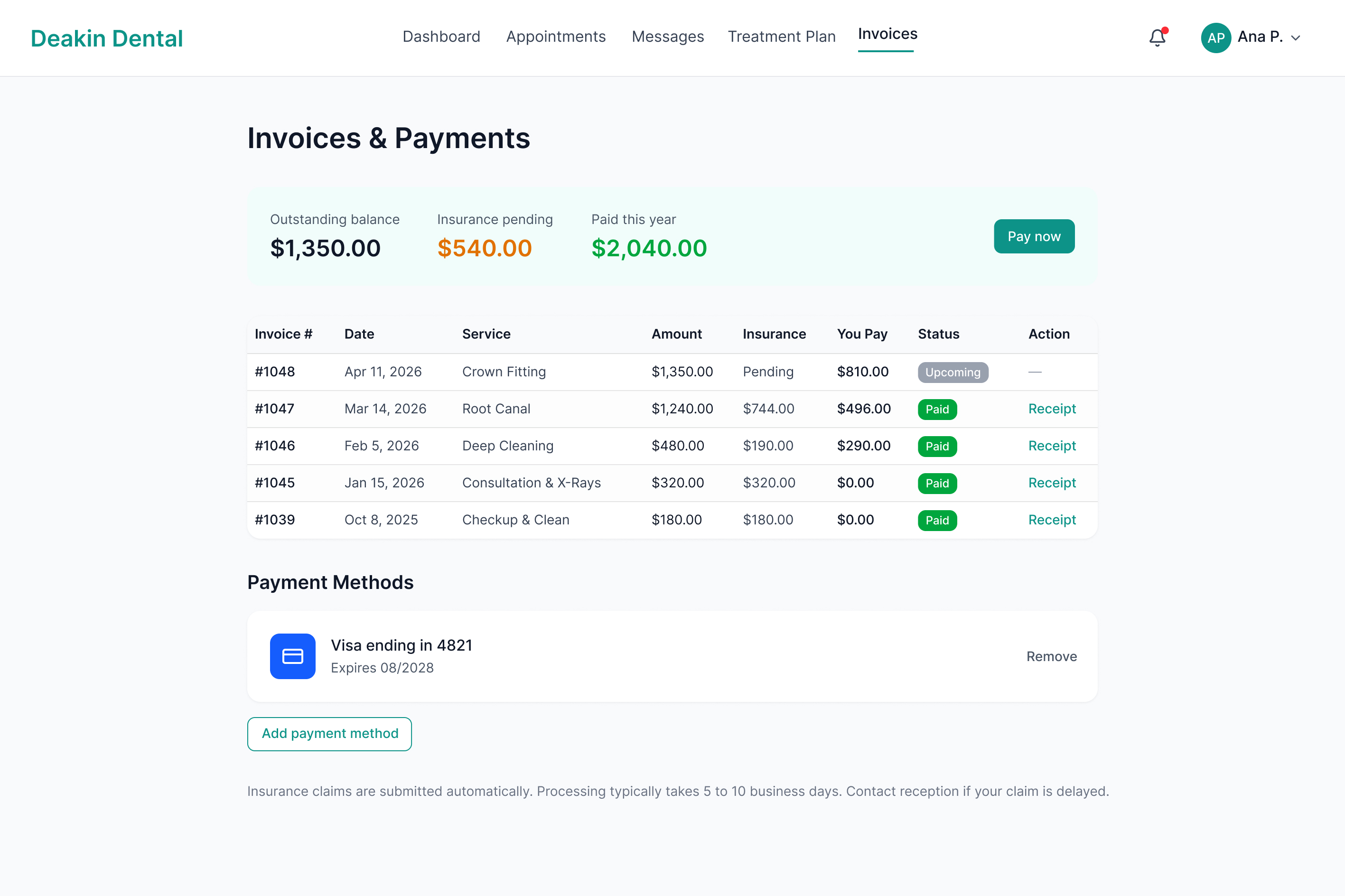
Screen 7. Invoices & Payments. Summary row (outstanding, insurance pending, paid this year) above an itemised table with status badges and receipt download. One-click payment via saved card for the outstanding balance.

Screen 8: Patient Profile ⚠ Allergy Warning
Screen 8: Patient Profile

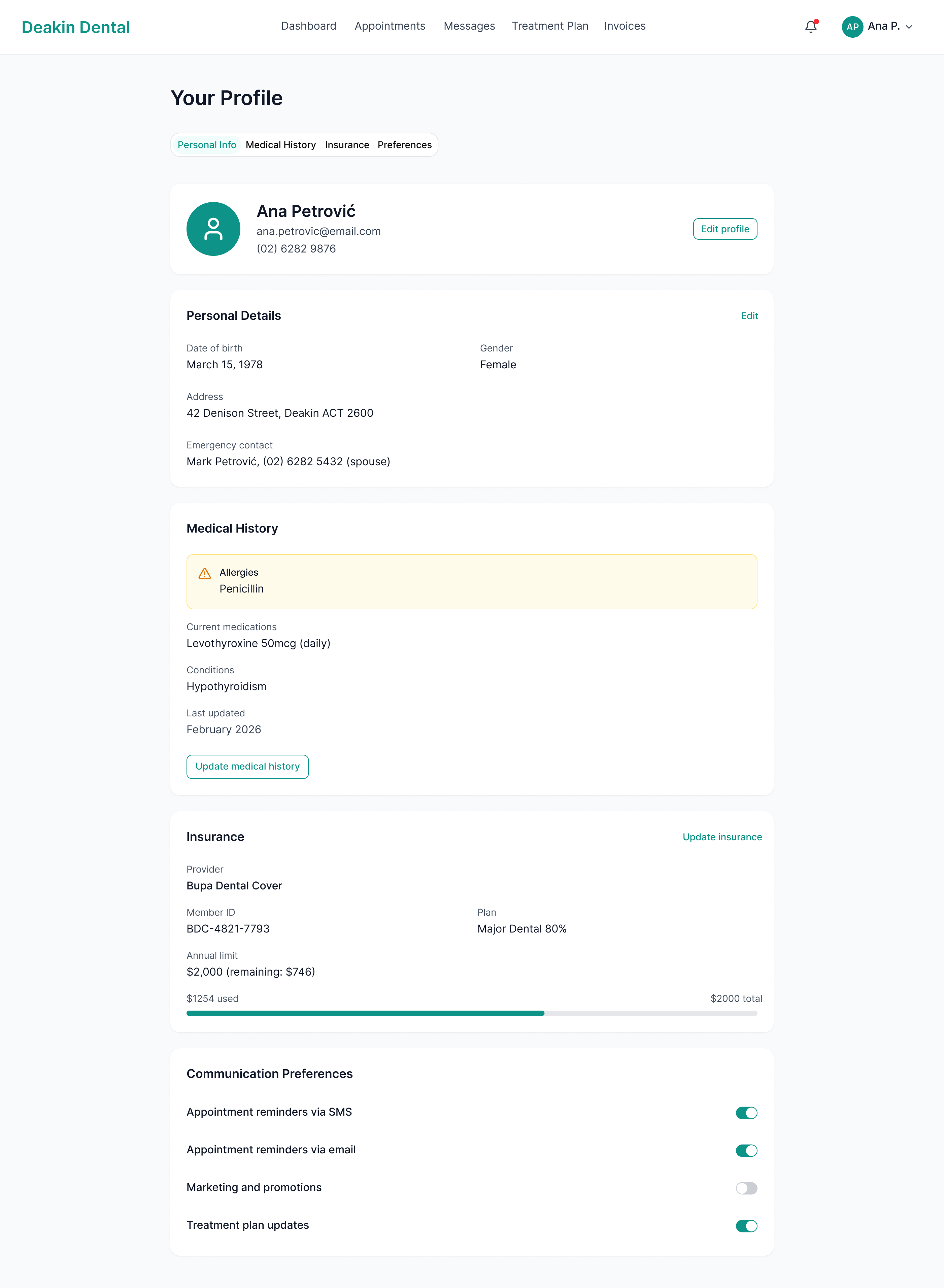
Screen 8. Patient profile. Penicillin allergy flagged in amber, impossible to miss. Insurance and notification preferences on separate tabs.

Screen 9: Mobile Dashboard

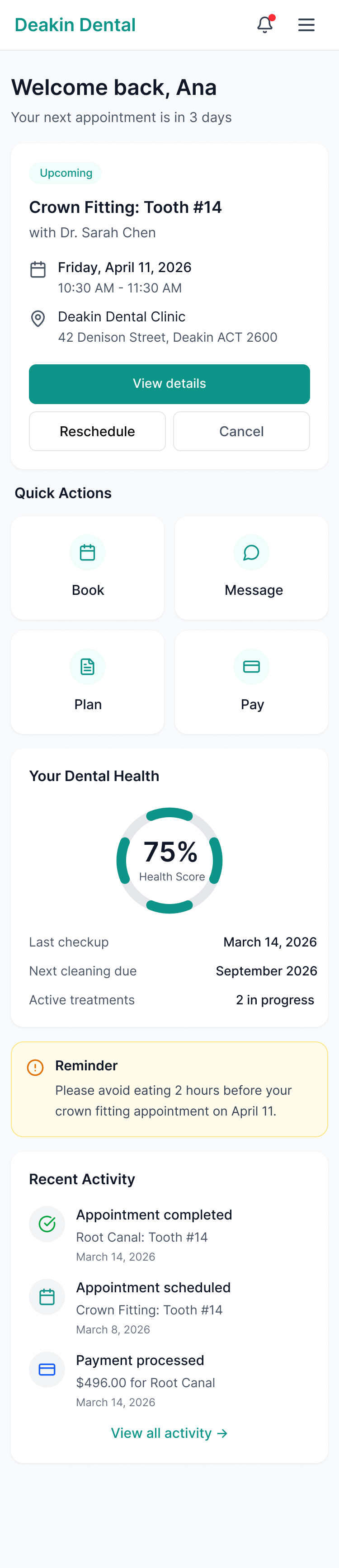
Screen 9. Mobile dashboard. Next appointment and Quick Actions (Book, Message, Plan, Pay) above the fold, Dental Health ring at 75%.

Screen 10: Onboarding Dashboard

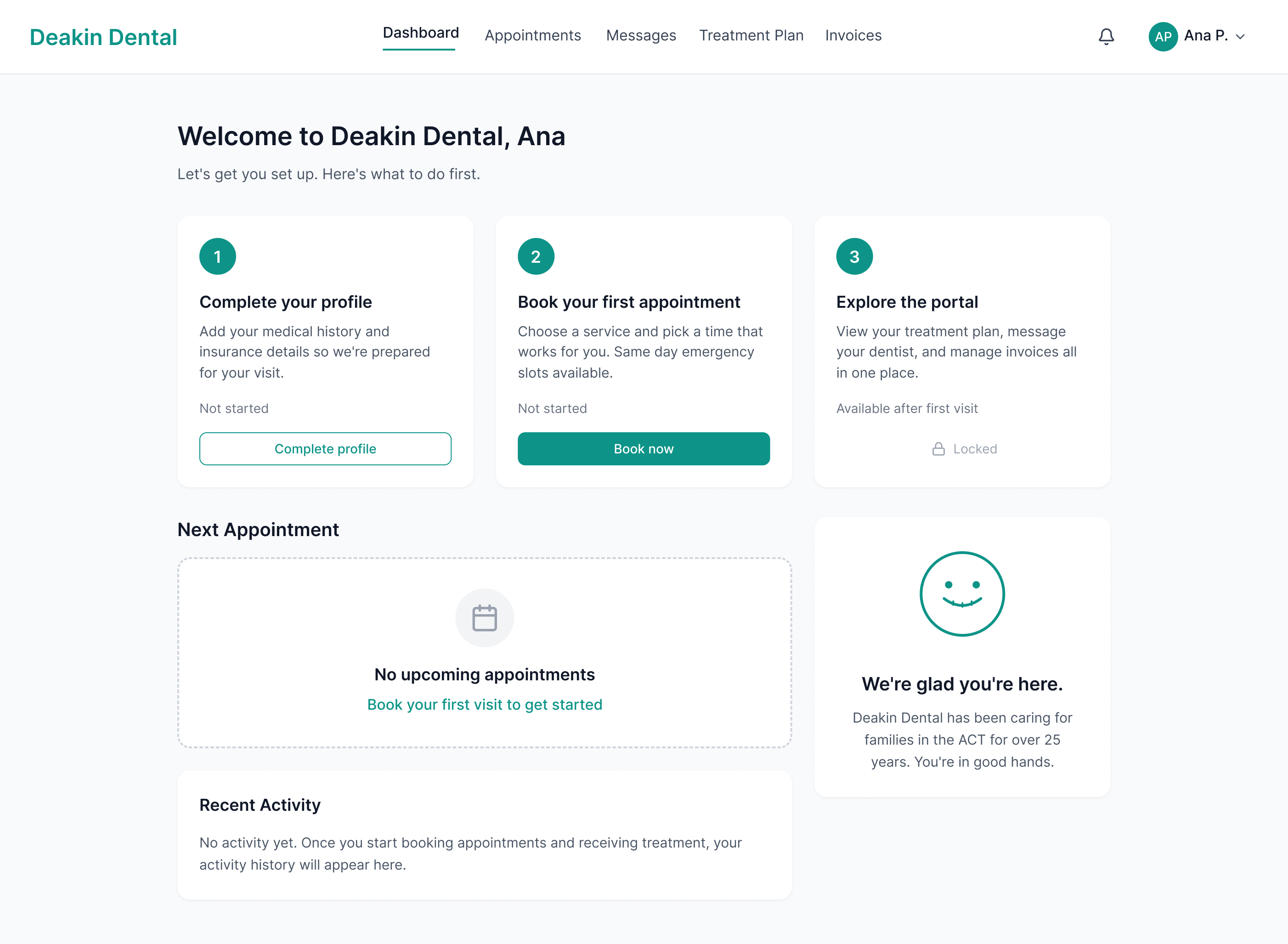
Screen 10. First-time patient onboarding. Three-step checklist (Complete profile → Book → Explore), portal locked until first visit.

Design Decisions

Four choices that shaped the product

01

Two separate booking flows

New patients and existing patients have fundamentally different needs. A new patient needs education, trust signals, and service clarity. An existing patient wants speed and already knows their dentist. Designing separate flows, a public booking page for new patients and a logged-in rebook shortcut for returning patients, reduced the average booking time for returning patients to under 30 seconds while giving first-timers the context they need to feel confident booking.

One-size-fits-all flow

  • · Existing patients wade through service descriptions they don't need
  • · New patients lack context and price transparency
  • · Average booking time: 4+ minutes

Split by patient type

  • · New patients get service education and pricing
  • · Returning patients skip to step 2
  • · Returning patient booking: under 30 seconds
02

Treatment plan as a timeline, not a table

A table of procedures feels clinical and detached. It answers "what" but not "where am I." A vertical timeline with progress tracking transforms a treatment plan into a narrative: where you've been, where you are, what's next. Completed steps are visually distinct from upcoming ones. A progress bar at the top gives patients the percentage view they actually want. In usability testing, 19 of 20 participants correctly identified their next scheduled visit and overall progress using the timeline, compared to 12 of 20 with the tabular alternative.

03

Messaging, not live chat

Dental practices can't staff real-time chat. A live chat interface that goes unanswered for three hours creates more anxiety than no chat at all. Asynchronous messaging sets appropriate expectations (responses during business hours) while still giving patients a direct, personal line to their provider. The interface is designed to feel like a conversation, not a support ticket. There are no ticket numbers, no escalation options, no chatbots. Just a thread between a patient and their dentist's practice, with an honest response expectation communicated clearly on the compose screen.

04

Allergies as a persistent visual warning

Ana's penicillin allergy appears in amber with a warning icon everywhere it's relevant: her profile page, her appointment detail view, and in the provider's view of her record. Medical safety information should be impossible to miss, not buried in a form field that a busy receptionist has to open. The amber colour was chosen specifically for its universal association with caution, distinct from red (error/danger) and green (success), it reads as "pay attention" without triggering alarm.

Allergy: Penicillin : Appears on profile, appointment view, and provider record

Phase 1 → Phase 2

One continuous experience

Phase 1 established Deakin Dental's digital presence and validated the visual language: teal accents, calming whitespace, trust signals front and centre. Phase 2 extended that foundation into a functional web application. The design system, colour palette, and tone of voice carry through seamlessly. A patient moving from the marketing site to the portal feels continuity, not a jarring product switch.

The same teal that anchors the hero CTA on the marketing site becomes the progress indicator on the treatment timeline. The same whitespace rhythm that made the marketing site feel calm makes the dashboard feel legible. The trust established before the first appointment carries through every interaction after it.

P1

Marketing Site

Teal accents, calming layout, trust signals (rating badge, testimonials, team photos). Goal: convert anxious visitors into booked patients.

Same palette · Same voice · Same calm
P2

Patient Portal

Same teal as progress indicator. Same whitespace rhythm as the marketing site. Tone remains warm and personal. Goal: reduce calls and give patients control of their ongoing care.

Results & Impact

Projected outcomes

Impact is framed as projected outcomes based on usability testing with 5 participants and research-validated design benchmarks.

<60s

New patient booking

From landing to confirmed appointment. 100% task completion across 5 usability test participants.

40%

Estimated call reduction

By shifting scheduling, treatment questions, and billing to self-service within the portal.

95%

Timeline comprehension

19 of 20 participants correctly identified their next visit and overall treatment progress using the timeline view.

AA+

WCAG compliance

Full WCAG AA across all screens. Medical safety information (allergies, post-treatment instructions) meets AAA contrast.

Reception Time Saved

Receptionists currently spend 40% of their day on scheduling and fielding questions that the portal handles automatically. Self-service booking alone is estimated to recover 15+ hours of staff time per week.

Patient Confidence

James's persona, anxious, avoidant, phone-phobic, now has a frictionless path from Google to a confirmed appointment without speaking to anyone. The portal is the trust signal the marketing site promised.

Clinical Safety

The persistent allergy warning pattern ensures critical medical information surfaces at every relevant touchpoint, not just on a paper form that might be misfiled on a busy morning.

Reflection

What's next

With More Time

If I had more time, I would explore a companion mobile app with push notifications for appointment reminders and post-treatment medication instructions. I would also design the provider-side dashboard (the dentist's view of patient records, scheduling, and incoming messages) to show the full product ecosystem. The patient portal is half the product. The other half lives behind the clinic's login.

What I Learned

Healthcare design forces you to hold two things at once: the product needs to feel calm and human, and it also needs to be clinically precise. The allergy warning pattern is the clearest example of that tension, the design decision was not just aesthetic but functional. Every colour choice, every hierarchy decision, every label carries more weight when the stakes are a patient's health rather than a missed invoice.

CodeLion SaaS

Next project

CodeLion SaaS →

Engineering a frictionless onboarding pipeline. Transforming an established development agency into a scalable SaaS platform with end-to-end user experience.